Internet Not Working
Step
Check if the site is down for everyone
Alongside that, verify your internet connection by trying to load other sites.
If other sites load, it's safe to assume that site is just down for the moment.

Step
Close tabs you are not using and hard refresh the page often.
To hard refresh the page, use Ctrl + Shift + R

Step
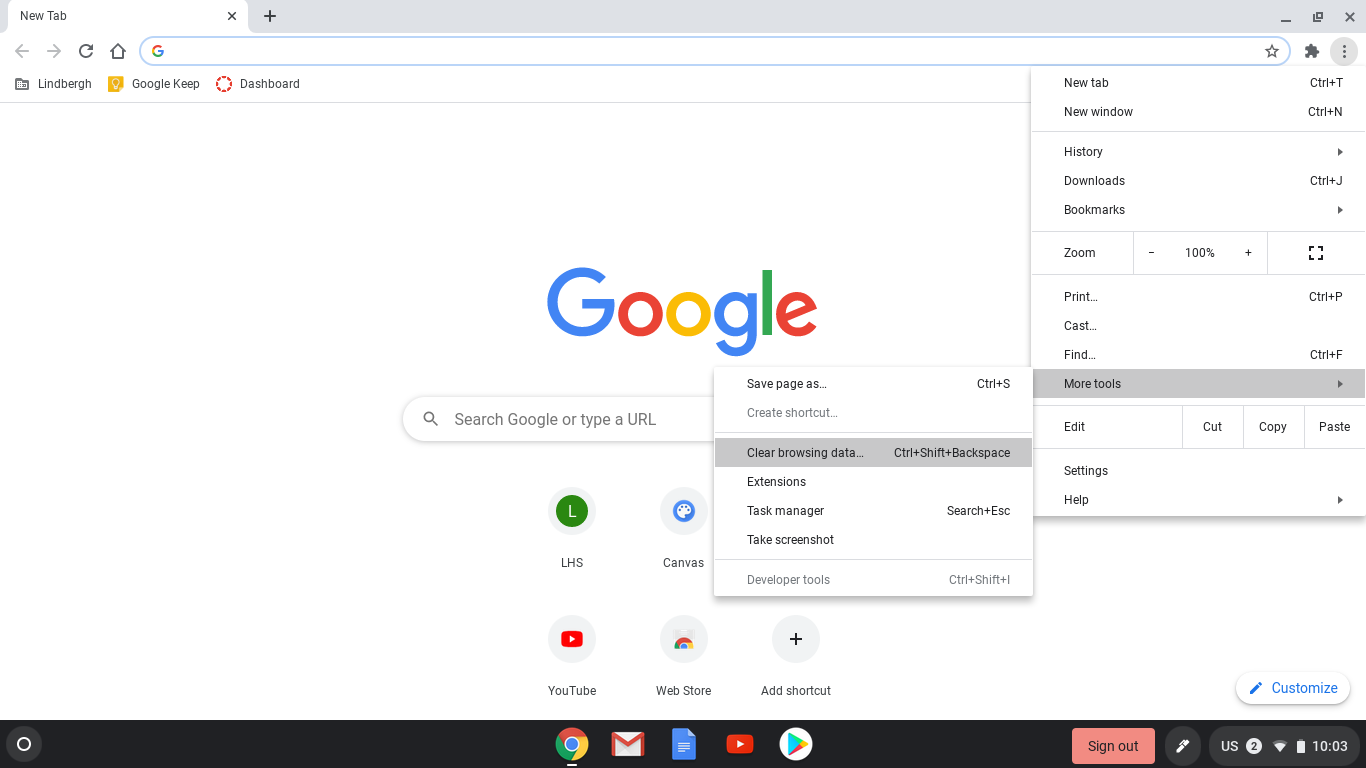
Clear your browsing history. This will log you out of websites, but it may fix your issue.
Open Chrome.
At the top right, click the three dots.
Click More tools, then Clear browsing data.
Click Clear data
Try accessing websites again after clearing your data.
Step
If none of those work, restart your Chromebook.
Hold down the refresh button on your button, it looks like a circling arrow.
Tap the power button on the side of your Chromebook, hold if needed.
The screen should turn black. Wait for the computer to turn back on.
